
Wear CGL beside your Discord name and represent Cimmarian wherever you chat. This guide shows you how to add our server tag and claim the community perks attached to it.
You do not need Nitro, a Server Boost or a paid Cimmarian membership to wear the tag. Start by joining the Cimmarian Discord.
Updated October 2026
Add the tag on desktop or browser
- Open User Settings using the cogwheel beside your Discord username.
- Choose Profiles or Edit User Profile.
- Find Server Tag, open the selector and choose Cimmarian / CGL.
Your choice saves automatically. Check your profile preview for the CGL tag.

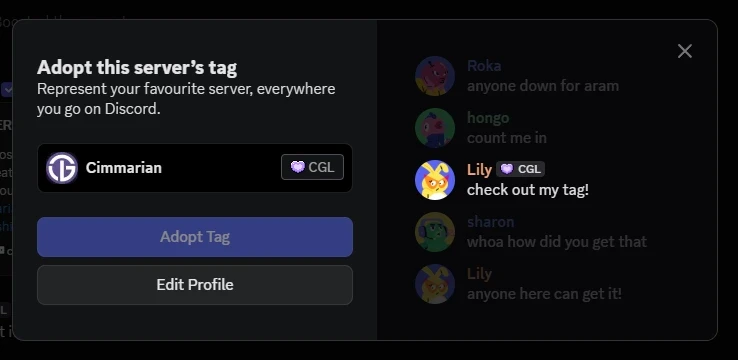
Shortcut: if Discord shows an invitation to adopt Cimmarian’s tag, you can use Adopt Tag there instead.
Add the tag on mobile
- Tap your avatar at the bottom-right of Discord, then choose Edit Profile.
- Find Server Tags and select Cimmarian / CGL.
The selection saves automatically.
Cimmarian tag perks
Alongside displaying the CGL tag, our community’s tag rewards include:
- A Cimmarian server role recognising your support.
- Streaming permissions in the relevant Cimmarian voice channels.
- Access to the community bots included with the tag role.
These are permissions within the Cimmarian server once the appropriate role is assigned. They do not include Discord Nitro or unlock paid website content.
Quick answers
Why can’t I find the CGL tag?
Check that you joined Cimmarian on the same Discord account you are editing. Update or restart Discord, then check your profile settings again. If the tag is still missing, ask for help in the server.
Why did my tag disappear?
A server tag can disappear if the server’s tag perk becomes unavailable. If Cimmarian changes its tag, you may need to select it again.
Can I wear more than one server tag?
You can display one at a time. Choosing CGL replaces your currently selected tag.
I have the tag, but my role or perks are missing.
Open a support ticket in the Cimmarian Discord. Include your Discord username and the role or feature you cannot access so the team can check your tag-related permissions.
Need a hand?
Visit the Member Help & FAQ, ask in the Cimmarian Discord, or read Discord’s official Server Tags guide for the latest interface instructions.
Thanks for representing the Cimmarian Frequency.