
Create Something for the Community
Community Events give Cimmarians the ability to turn Discord into more than a chat room.
Want to organize a game night? Run a tournament? Explore VRChat together? Host a watch party? Get a group together for an IRL activity?
Create an event and invite other Cimmarians to join you.
Community Events are experiences created by members for members. Unless an event is specifically identified as an official Cimmarian event, it should be considered independently hosted by the member who created it.
Ready to Jump In?
VIEW UPCOMING EVENTS
See what's coming up and find your next Community Event.
CREATE A COMMUNITY EVENT
Create your own event and invite other Cimmarians to join you.
What Can You Create?
Community Events can be almost anything that brings Cimmarians together.
🎮 Gaming — Co-op sessions, multiplayer nights, raids, fighting-game lobbies or tournaments.
🥽 VR & VRChat — World hopping, club nights, exploration or community meetups.
📺 Watch Parties — Movies, anime, showcases, game reveals or community viewing nights.
🎨 Creative Events — Art sessions, music discussions, screenshot contests, creative challenges or collaborative projects.
💬 Social Events — Hangouts, community discussions, themed nights or just getting people together.
🌎 IRL Events — Public meetups, conventions, arcade trips and other real-world activities where appropriate.
You do not need to create something huge. Sometimes the best Community Event is simply:
“Anyone want to play Helldivers tonight at 8?”
The event system simply gives that idea a place, a time, RSVPs and reminders.
Who Can Create Community Events?
Community Event creation is available to Cimmarians with a Supporter Membership or higher.
This gives supporting community members additional tools to create activities and bring Cimmarians together.
All Cimmarians can still discover and participate in Community Events they are eligible to join.
Joining an Event
Joining is easy.
Find an event that interests you, read the event description and RSVP using the available attendance option.
Once you RSVP, keep an eye on the event for updates and reminders from the host.
If your plans change or you can no longer attend, update your RSVP so the host has an accurate idea of attendance and knows when a spot becomes available.
Creating Your First Event
You do not need to understand every Sesh setting to create an event.
For most Community Events, you only need a good title, date, time, location and description.
-
Open Create an Event. Sign into Sesh using your Discord account.
-
Give your event a clear title. Make it immediately obvious what Cimmarians are being invited to do.
-
Choose the date, start time and duration.
-
Write the event description. Explain what you are doing, what attendees should expect and whether they need anything before joining.
-
Choose the location. For Discord activities, select the appropriate Cimmarian channel. If the game does not currently have a dedicated area, use a suitable Just Chatting channel. For voice-based activities, you can also use the dedicated voice channel under the Events category in Discord.
-
Review the event and press CREATE EVENT.
That's it.
The default settings will work for many Community Events.
Make Your Description Useful
A clear description makes a better event.
A good event description prevents confusion and makes people much more comfortable joining.
A simple description could look like this:
HELLDIVERS 2 COMMUNITY NIGHT
We're putting together a casual Helldivers 2 session Friday night.
Start: 8:00 PM EST
Expected Length: Around 2 hours
Location: Cimmarian Discord
Skill Level: Everyone welcome
What You Need: Helldivers 2 and access to voice chatDrop in, have some fun and meet some other Cimmarians. RSVP if you plan on joining!
You don't need to write an essay. Just give people enough information to know what they are signing up for.
Community Event Rules
Community Events give Cimmarians additional freedom to organize activities, but that freedom comes with responsibility.
Keep Events Community-Focused.
Events should exist because you want to do something with the Cimmarian community—not because you want free advertising.
Do not create events primarily intended to promote Twitch channels, social accounts, other Discord servers, businesses, products or unrelated external communities.
Keep Events Appropriate for Cimmarian.
Cimmarian does not support NSFW Community Events. If the primary purpose of an event involves adult or explicit material, it should not be created through the Community Event system.
Explain What You're Hosting.
Clearly describe the activity, expectations, location and anything attendees need before participating.
Cimmarian Rules Still Apply.
Creating or attending a Community Event does not bypass CGL | Cimmarian community rules.
Serious or intentional abuse of the event system may result in moderation action or loss of Community Event privileges.
The Host Is Responsible for Their Event.
Community Events are member-hosted unless specifically identified as an official Cimmarian event. Hosts are expected to manage their activities responsibly and treat attendees appropriately.
If you need to change the time, location or cancel your event, update the event as soon as possible so attendees receive accurate information.
For IRL events, use common sense. Meet in appropriate public locations, protect personal information and never publicly post someone's private address or personal information without permission.
Optional Event Settings
Once you are comfortable creating events, Sesh gives you several additional tools.
RSVP
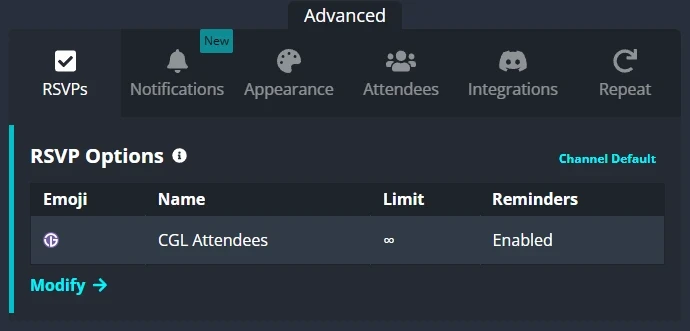
Customize how members respond to your event. For most events, the default RSVP options are perfectly fine.
You can customize these when your event needs something more specific.
For example, a fighting-game tournament might use different RSVP options than a casual game night.
Reminders & Notifications
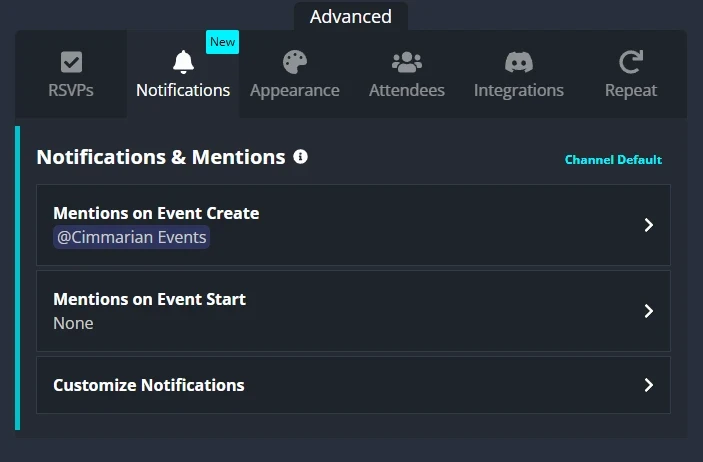
Sesh can remind members about upcoming events.
For most events, our defaults should be enough. Change these settings when your particular event needs additional notice.
Avoid unnecessary notifications or excessive pings.
Appearance

You can customize some of the visual presentation of your event, including its image and appearance.
Have fun with it, but your event artwork should represent the activity itself.
Community Events are not an advertising system, so streamer banners, advertisements and unrelated promotional graphics should not be used.
Attendees
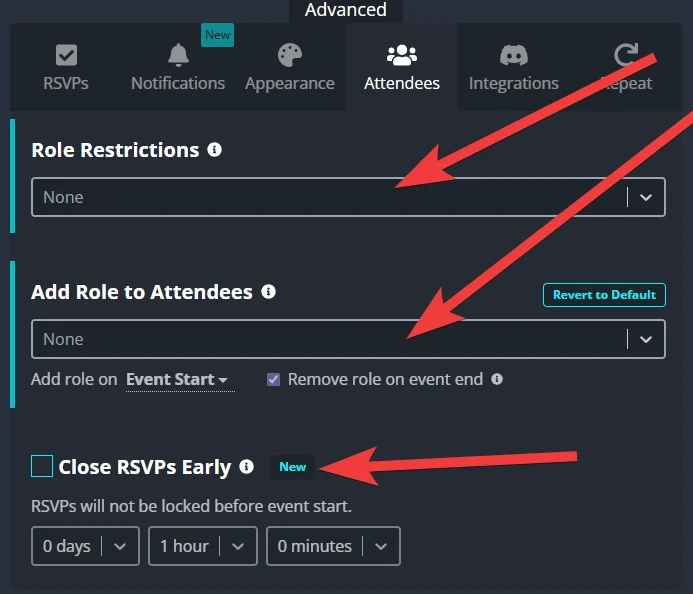
For more organized events, you may have access to additional attendance controls such as role restrictions, attendance limits or closing RSVPs before the event begins.
Most casual events will never need these settings.
Discord Integration
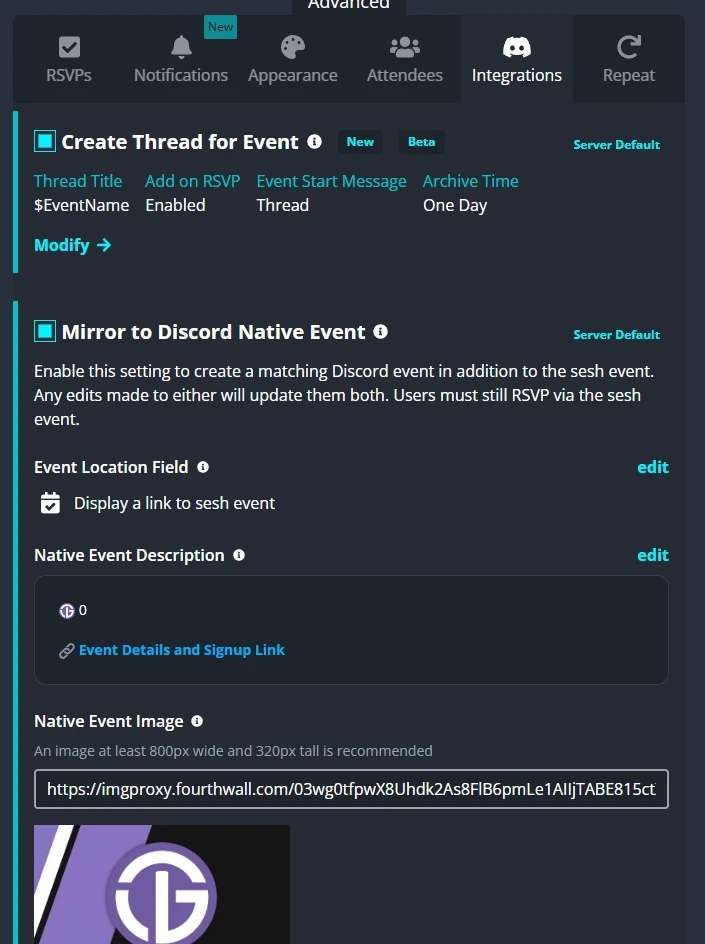
Discord integration allows the event to appear within the Cimmarian Discord event system.
Our defaults are already configured for this, so most hosts should leave these settings alone.
Repeat Events

Hosting something every week or every month?
Use the Repeat option to create a recurring Community Event.
If you're only running the activity once, leave Repeat disabled.
What Makes a Great Community Event?
The best Community Events usually aren't the most complicated ones.
They simply answer three questions:
What are we doing?
When are we doing it?
How can another Cimmarian join us?
That's the entire idea behind Community Events.
You don't need to be a professional event organizer.
You just need an idea.
Turn “Anyone Want to Play?” Into an Event.
Create the lobby.
Set the time.
Invite the Cimmarians.
Need Help?
If you're unsure whether an event is appropriate or need help setting one up, open a Support Ticket inside the CGL | Cimmarian Discord.
We're happy to help you get it running.
Find Your Next Event
Not ready to host yet?
See what other Cimmarians are planning and jump into something that sounds fun.
VIEW UPCOMING COMMUNITY EVENTS
FOR CIMMARIAN!